

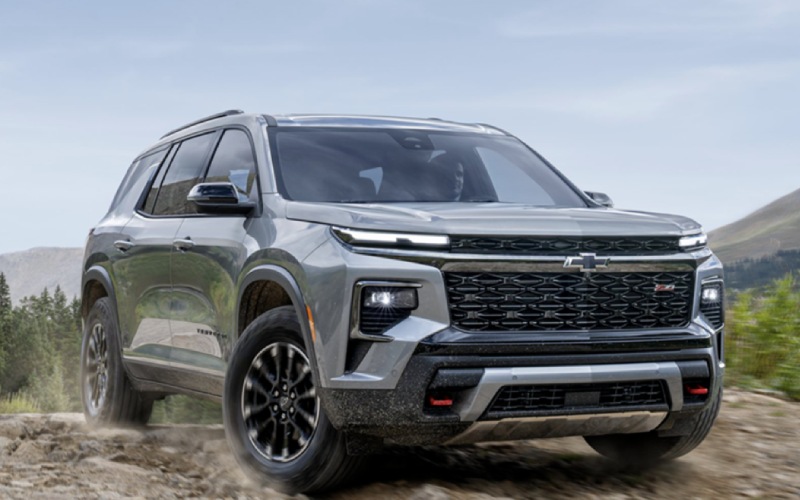
Matt Blatt Nissan – Why a used Chevrolet SUV fits daily life around Vineland, NJ
Shopping for a used Chevrolet SUV is often about striking the right balance—comfortable enough for everyday errands, capable enough for road trips, and smart enough to keep technology simple. Around Vineland, NJ, that balance shows up in how Equinox, Traverse, Blazer, Trax, and Tahoe handle a week of commuting on Route 55, an evening run to the outlets, or a family visit down the Black Horse Pike. Many models include the Chevrolet Infotainment System with Apple CarPlay and Android Auto, so maps, music, and calls are never more than a touch away. Driver-assist features like Forward Collision Alert and Lane Keep Assist with Lane Departure Warning are common on recent pre-owned options, helping reduce stress when traffic stacks up or visibility tightens. Put simply, Chevrolet SUVs deliver approachable tech and practical space without overcomplicating the drive.
Space is where used Chevrolet SUVs really stand out. Equinox offers flexible seating and a low liftover height that makes loading groceries less awkward, while Blazer adds a wider cargo area for strollers, folding tables, or sports gear. Traverse and Tahoe scale up with three-row versatility, allowing quick seat flips when you need to carry more people or more stuff. Available features like a Hands-Free Power Liftgate and multiple USB ports make morning routines faster and rear-seat rides friendlier. Because these models were designed from the start for families and active households, even a used example typically retains clever storage cubbies, supportive seating, and high-visibility sightlines that make parking at busy shopping centers or tight garages far less of a chore.
Tech confidence matters as much as space. The Chevrolet Infotainment System focuses on legible menus and intuitive controls, and many vehicles pair that with available 4G LTE Wi-Fi Hotspot capability so passengers can stay connected. Physical volume and tuning knobs on many models keep eyes on the road and fingers off complicated submenus. When advanced features appear—such as HD Surround Vision, Rear Cross Traffic Alert, or IntelliBeam automatic high beams—they work quietly in the background to provide more awareness without constant beeps or distractions. For families teaching a new driver, Teen Driver technology is a meaningful extra layer of oversight, with customizable settings and an in-vehicle report card to help reinforce good habits.
How should an online shopper evaluate a used Chevrolet SUV efficiently? Start by matching space and power to how you drive. If day-to-day mileage is mostly urban and suburban with occasional highway runs, Equinox or Trax often nails the footprint and efficiency. If the household shifts between carpooling and cargo duty, Blazer or Traverse supplies the added room. Tahoe brings full-size confidence for towing and big-family logistics. Electric options like Bolt EUV also deserve a look for short-hop commuting and near-silent operation. No matter the model, review photos closely for wheel condition, seat wear, and cargo-area scuffs that signal how the vehicle was used. Then confirm features—Apple CarPlay, Android Auto, available power seats, heated front seats, and safety tech—against the listing details to ensure the must-haves are included.
- Equinox: Versatile 2-row SUV with an easy-driving feel, flexible cargo space, and approachable tech.
- Traverse: 3-row comfort with adult-friendly second row, quick-fold third row, and confident highway manners.
- Blazer: Sporty style, wider cargo bay, and strong passing power with available V6 options.
- Trax: Compact footprint that simplifies city parking plus tall seating for better outward visibility.
- Tahoe: Full-size capability with available V8 strength, generous tow features, and expansive interior space.
Beyond features, think about the driving character. Chevrolet tunes suspensions for stability and comfort, making quick maneuvers feel predictable. StabiliTrak Electronic Stability Control and 4-wheel antilock disc brakes are widespread, and available All-Wheel Drive on many SUVs improves traction in rain or on uneven pavement. Transmissions—commonly 6-speed, 8-speed, or 10-speed automatics—aim for smooth shifts and relaxed cruising at highway speeds. These fundamentals help keep road trips calm and errands easy, especially when lane changes, tight merges, or crowded parking lots are part of the weekly routine.
For shoppers exploring long-term ownership, parts availability and service access make a difference. Chevrolet powertrains, from efficient Ecotec 4-cylinders to proven small-block V8s, are supported by deep parts catalogs and technician familiarity. That means routine maintenance, occasional repairs, and software updates tend to be straightforward. When a vehicle includes available OnStar Safety & Security, you gain extra peace of mind with features like Automatic Crash Response and access to emergency services. Those layers—mechanical familiarity and safety support—translate into confidence well beyond the test drive.
If you are comparing listings and planning a test drive, use this quick checklist to keep the process smooth.
- Confirm must-have features: Verify Apple CarPlay, Android Auto, seat configuration, power liftgate, and safety tech match your priorities.
- Review photos carefully: Check seats, steering wheel, wheels, and cargo area for wear patterns that indicate previous use.
- Evaluate tires and brakes: Tread depth, even wear, and pedal feel on the test drive can hint at maintenance habits.
- Listen and feel: During the drive, note transmission shift quality, steering centering, and any unusual noises over bumps.
- Match the model to the mission: Choose Equinox or Trax for tight parking, Blazer or Traverse for space, Tahoe for towing and big families.
At the end of the day, a great used Chevrolet SUV should fit your life without compromise. That is where local expertise helps. Matt Blatt Nissan, serving Hammonton, Galloway, and Vineland, pairs an easy online research process with clear vehicle histories and attentive support when questions pop up. From first click to final handshake, the goal is straightforward—make it simple to find a used Chevrolet that feels right as soon as the key turns.
Frequently Asked Questions:
Do used Chevrolet SUVs commonly include advanced safety features?
Yes. Many used Chevrolet SUVs offer Forward Collision Alert, Automatic Emergency Braking, Front Pedestrian Braking, and Lane Keep Assist with Lane Departure Warning. Availability varies by model and equipment, so review each listing’s feature details carefully.
Can I get Apple CarPlay and Android Auto in a used Chevrolet?
In many cases, yes. The Chevrolet Infotainment System on numerous models supports Apple CarPlay and Android Auto, enabling seamless integration for calls, messages, music, and maps.
How do Chevrolet SUVs handle tight parking and busy traffic?
Compact options like Trax and Equinox feature smaller footprints and good outward visibility, while available HD Surround Vision and Rear Cross Traffic Alert on various models help with maneuvering in crowded lots and narrow streets.
Is a used Tahoe a good choice for towing and big families?
Often, yes. Tahoe’s available V8 power, generous interior space, and common tow-friendly features make it a strong candidate for larger households and those who need to haul trailers or recreational gear.
Are used Chevrolet Bolt EV or Bolt EUV models practical for daily driving?
Absolutely. Bolt EV and Bolt EUV deliver instant torque, quiet operation, and regenerative braking that suits stop-and-go traffic. For commuters with predictable routes and access to charging, they can be an excellent fit.
What should I look for during a test drive?
Focus on steering feel, transmission smoothness, brake response, and ride quality over rough pavement. Confirm infotainment responsiveness and check safety-system indicators to ensure features function as expected.
Request more information
Connect with us


Recent Blog Entries
- Can I monitor and manage a 2026 Nissan Sentra® from my phone in Atlantic City, NJ?
- Will a 2026 Nissan Frontier fit in a typical garage in Egg Harbor Township, NJ?
- Is the 2026 Nissan Rogue Easy to Park and Maneuver around Vineland, NJ?
- Why the 2026 Nissan Rogue Platinum AWD is a Smart Choice for Mays Landing, NJ Drivers
- Why the 2026 Nissan Murano SL AWD is a Smart Pick for Williamstown, NJ Drivers