

Dual 12.3-inch Displays in the 2026 Nissan Kicks – Smarter Small-SUV Tech for Atlantic City, NJ Drives

Matt Blatt Nissan – Dual 12.3-inch Displays in the 2026 Nissan Kicks – Smarter Small-SUV Tech for Atlantic City, NJ Drives
What the Big Screens Bring to Your Daily Drive
The 2026 Nissan Kicks takes a bold step forward in small-SUV usability with available dual 12.3-inch high-resolution displays. Think less clutter and more clarity from the moment you get behind the wheel. One expansive screen anchors the center dash as your crisp, intuitive touch hub, while the available driver display keeps essential info front and center — so you can stay focused on the road without bouncing between menus.
Around Atlantic City, it’s the kind of tech that helps you glide from garage exits to one-way corridors with less stress. The layout puts maps, audio, and driver-assist information within easy reach, and the larger text and icons help reduce glance time. Want navigation in one place and driver info in another? The Kicks’ “monolith” style design blends both within your field of view in a big, polished way, so it feels natural to glance, decide, and go.
Even better, the entire system is designed to keep pace with your routine. Wireless Apple CarPlay® and Android Auto™ help your apps live on the screen without a tangle of cords, and the interface responds quickly to taps and swipes. It’s the best of both worlds — modern, elegant tech that still feels easy on a busy day.
Wireless Connectivity That Stays Out of Your Way
Nothing slows you down like tech that makes you work. The Kicks’ standard 12.3-inch NissanConnect® touch-screen is built for instant familiarity, and the available dual-screen setup feels like a natural extension for those who want more data at a glance. Tell your smartphone to pair once, and your go-to playlist, calendar, and messages are right there when you start the engine. No cables, no shuffling windows — just a clean, streamlined experience.
That simplicity pays off in traffic. With the display doing the heavy lifting on navigation and audio, you’re free to keep your hands on the wheel and eyes confident on the road ahead. Add available features like the Intelligent Around View® Monitor, and those screens do more than entertain — they help you park and maneuver with confidence when space gets tight near the Boardwalk or in a packed parking deck.
It’s also the small conveniences that add up: on-screen prompts that make sense the first time you see them, voice commands that let you keep your focus where it belongs, and a layout that puts the right functions on the right screen. If you’ve ever wished your vehicle felt as intuitive as your phone, the Kicks makes a strong case.
Tips to Get More From Your Kicks Displays
Want the most out of those beautiful screens from day one? Here are a few practical ideas that pay off on real drives around town and on longer trips.
- Pair your phone before pickup — Set up wireless Apple CarPlay® or Android Auto™, so your apps appear the moment you start the engine.
- Customize your home screens — Place your most-used tiles (navigation, audio, calls) where your eyes naturally go.
- Use voice for quick tasks — Keep hands on the wheel while you cue up music, set a destination, or send a message.
- Try camera shortcuts — If equipped with the Intelligent Around View® Monitor, practice activating the camera views as you enter tight parking.
- Keep it updated — If over-the-air or dealer updates are available, staying current can improve responsiveness and feature compatibility.
These quick tweaks take minutes, but the payoff shows up mile after mile. When the tech fits your routine, the whole car feels easier to live with.
Frequently Asked Questions:
Are dual 12.3-inch displays standard on every 2026 Kicks?
Every 2026 Kicks includes a standard 12.3-inch NissanConnect® touch-screen. The dual high-resolution 12.3-inch display configuration is available on select trims and packages.
Does the Kicks support wireless Apple CarPlay® and Android Auto™?
Yes. Wireless Apple CarPlay® and Android Auto™ are supported, enabling fast access to your apps without plugging in a cable.
Can I view camera feeds on the main screen when parking?
If equipped with the Intelligent Around View® Monitor, you can view a composite 360-degree perspective on the display to help with maneuvering into tight spaces.
Is the display layout customizable?
Yes. The available dual-display layout lets you tailor the information shown, placing key driving data and infotainment functions where they’re easiest for you to see and use.
At Matt Blatt Nissan, we believe technology should simplify your day, not complicate it. That’s why we encourage shoppers to spend a few extra minutes in the driver’s seat during a test drive to explore how the screens work with your habits. The difference becomes obvious as soon as you start navigating and parking in tighter spots — the Kicks feels like a small SUV built around the way you actually drive.
If you split time between city streets, highway stretches, and frequent parking situations, the Kicks’ interface stands out for being both handsome and genuinely helpful. From the quick response of the touch controls to the way wireless integration fades into the background, it’s a quiet upgrade that improves every trip. Pair it with available features like ProPILOT Assist 1.0 and Intelligent Around View® Monitor, and you have a technology toolkit that elevates confidence and reduces friction in busy environments.
Ready to see how the Kicks’ screens work for you around Atlantic City? Bring your everyday routine — your navigation habits, your playlists, even your parking challenges — and try it in real time. Once you’ve used the displays the way you’d use them on a normal day, it’s hard to imagine going back. For shoppers seeking a truly modern small SUV interface, the Kicks sets a high bar and clears it with ease, serving Mays Landing, Atlantic City, and Hammonton.
Request more 2026 Nissan Kicks information

Matt Blatt Nissan – Smarter Cargo Days around Atlantic City, NJ – How the 2026 Nissan Rogue’s Divide-N-Hide System Keeps Life Organized
Juggling errands, school pickups, and a quick dash to the outlets or the marina is part of the rhythm around Atlantic City, NJ. That’s where the 2026 Nissan Rogue’s Divide-N-Hide cargo system shines. It turns a roomy cargo area into a flexible, multi-level zone you can configure in seconds, keeping groceries steady, beach gear separated, and valuables tucked out of sight when you’re parking in a busy garage near the boardwalk.
Instead of a one-position floor you set and forget, Divide-N-Hide uses adjustable panels to create bays, a flat load floor, or a hidden lower compartment. The result is a cargo space that actually adapts to your day. From soccer cleats and folding chairs to a week’s worth of groceries, it all has its place—and it all stays put when the roads get choppy, or you’re navigating tight turns near the inlet.
How Divide-N-Hide Works for Daily Life
The genius of Divide-N-Hide is simplicity. You lift, slide, or set the panels in different positions to build compartments that make sense for the moment. Need a level surface for larger boxes? Done. Want a lower shelf to keep cleaning supplies upright? You’ve got it. Prefer to stash a laptop or camera bag out of view when you’re grabbing dinner on Atlantic Avenue? The covered area has you covered.
- Grocery stabilizer: Create a lower compartment so bags don’t tip or roll.
- Beach day split: Keep towels and sunscreen above, sandy toys below.
- Valuables hidden: Store smaller items under the panel for added privacy.
- Flat load floor: Level the space for bigger boxes or a folded stroller.
- Pet-friendly zone: Keep a divider in place so pet gear stays contained.
It’s the kind of small-but-smart solution you appreciate after a couple of runs to the store or a Saturday in and out of local parking garages. The low lift-over height helps too, especially when you’re loading heavier items like cases of water or coolers.
Family-Friendly By Design
Divide-N-Hide pairs with the Rogue’s family-first interior to make everyday logistics easier. Wide rear-door openings simplify loading car seats and booster swaps. The available Motion Activated Liftgate helps when your hands are full—just a quick kick under the bumper, and the hatch opens. And because the second-row seats fold in a snap, you can transition from people to cargo (or a mix of both) without breaking your stride.
Inside, the Rogue’s smart storage touches complement the cargo area. You’ll find handy cubbies, bottle-friendly door pockets, and a center console that’s easy to reach from the driver’s seat. It all adds up to a calm cabin, even when you’re pressed for time between the office and after-school stops.
Tech That Complements the Cargo
The Rogue’s available 3D Around View Monitor with Invisible Hood View adds confidence when you’re backing into tight loading zones or up to a curb for a quick handoff. The extra perspectives help you avoid scraping a wheel or nudging a post—common hazards in dense parking structures near casinos or the outlets.
Planning a multi-stop loop across town? Available Google built-in keeps you on track with Google Maps built right into the vehicle, so your routes and recent searches are always handy. The MyNISSAN app’s Remote Engine Start and Remote Vehicle Status add convenient touches—precondition the cabin, check lock status, and head out with one less thing on your mind.
Frequently Asked Questions:
Is Divide-N-Hide standard on every 2026 Rogue?
Availability can vary by trim and package. Many Rogue configurations include flexible cargo features—ask our team to confirm the setup on the exact vehicle you’re considering.
How much total cargo room does the Rogue offer?
With the second-row seats folded, Rogue offers up to 74.1 cubic feet of cargo space. Divide-N-Hide helps you use that room more efficiently day to day.
Can I fit a stroller and golf clubs at the same time?
Yes—use the adjustable panels to create a level base for a folded stroller while reserving a separate area for a golf bag, then secure items to minimize shifting.
Is the Divide-N-Hide surface easy to clean?
The panels are designed for real-life use and are easy to wipe down. For heavier messes, remove items and clean with mild interior-safe products.
Does Divide-N-Hide affect the spare tire area?
Divide-N-Hide works with the Rogue’s cargo layout. Ask us to show you the specific panel arrangement, underfloor storage, and spare tire access on your preferred trim.
How It Stacks Up in the Class
Plenty of compact SUVs offer flat floors and 60/40-split seats—but few bring the Rogue’s panel-based flexibility. Being able to move from a level floor to a two-tier setup or a hidden compartment without removing accessories is a meaningful upgrade in real-world use. Pair that with the Rogue’s supportive seating, available Tri-Zone Automatic Temperature Control, and a quiet cabin, and you have a more livable space every day.
What’s more, the Rogue’s available Intelligent All-Wheel Drive with Snow and Off-Road modes means you’re set for sandy lots, gravel paths to local parks, and shoulder pull-offs on scenic back roads. It’s not just extra space—it’s space that supports a wider range of plans.
If you’re mapping out how the Rogue fits into your routine around Mays Landing, Atlantic City, and Hammonton, try this: bring a typical week’s worth of gear to your test drive. Groceries, backpacks, sports bags—whatever you actually carry. See how Divide-N-Hide sorts and secures it. That hands-on check is often what seals the decision.
- Quick setup: Practice two or three panel positions before your first big errand loop.
- Keep essentials handy: Use the upper tier for items you reach for most often.
- Protect valuables: Use the under-panel space when parking in busy areas.
- Secure heavier items: Keep weight low and centered to reduce shifting.
From school lines to boardwalk runs, Divide-N-Hide adds order to full days. If you want to compare layouts across trims—or see how the system pairs with accessories like cargo nets—our Matt Blatt Nissan team can walk you through several setups in minutes. You’ll leave with a clear sense of which configuration matches your life.
Request more 2026 Nissan Rogue information
What to Know About the 2026 Nissan Sentra
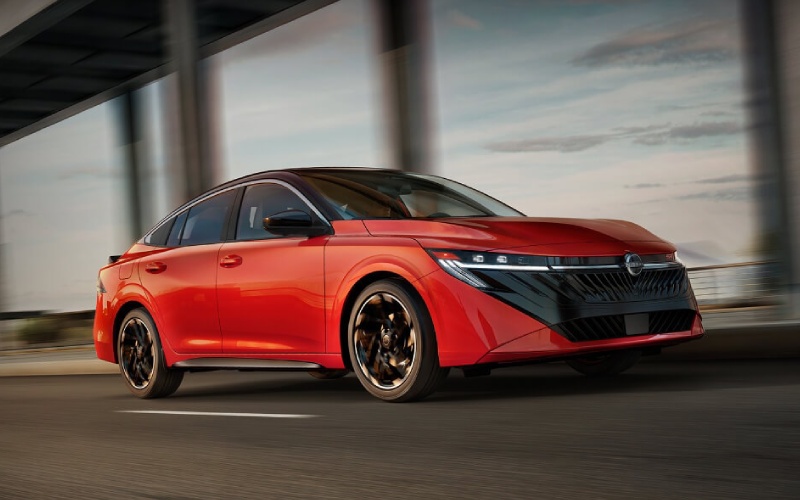
Matt Blatt Nissan – What to Know About the 2026 Nissan Sentra
The 2026 Nissan Sentra arrives with a confident redesign, a richer tech suite, and thoughtful refinements that make daily driving feel more premium. It stays true to what shoppers love about compact sedans—easy maneuverability, excellent efficiency, and approachable ownership—while adding upscale touches that punch above its weight.
If you are comparing compact cars this year, place the Sentra near the top of your list. From its striking exterior to its streamlined interior interface and available driver assistance, the latest model balances value with sophistication in a way that resonates with commuters, first-time buyers, and seasoned drivers seeking a smarter, more comfortable ride.
Design and First Impressions
The 2026 Sentra looks crisp and purposeful from every angle. A bold front fascia, sharp body lines, and a wide stance communicate stability and style without going over the top. Standard LED headlights and taillights add both visibility and visual drama, while trim-specific finishes allow you to lean sporty or refined.
Inside, the cabin is clean, modern, and surprisingly quiet for the class. Controls fall naturally to hand, sightlines are open, and supportive seating keeps long drives comfortable. Details like contrast stitching, attractive trim materials, and a cohesive dashboard layout create an upscale feel you notice right away—especially once you start interacting with the larger, more intuitive displays.
Performance and Efficiency
The Sentra’s front-wheel-drive dynamics make it easy to place in traffic and confidence-inspiring in tight corners and parking decks. Power comes from a refined 4-cylinder engine paired with Nissan’s Xtronic CVT, tuned for smooth response and real-world efficiency. Around-town drivability is relaxed and predictable, and highway merging is steady and reassuring.
Numbers tell part of the story—strong fuel economy estimates and balanced output make the Sentra a practical choice—but what stands out is how composed the car feels at speed. Ride quality is calm, cabin noise is well managed, and steering inputs translate precisely, lending a higher-end character to everyday errands and commuting.
- Horsepower: Up to 149 hp for confident daily driving
- Torque: 146 lb-ft for smooth, responsive acceleration
- Efficiency: EPA-estimated 30 mpg city and 38 mpg highway, depending on conditions
- Transmission: Xtronic CVT for refined, seamless power delivery
- Drivetrain: Front-wheel drive for predictable handling and year-round usability
Cabin Tech and Connectivity
Technology is where the 2026 Sentra makes a major leap. The available monolith display integrates dual 12.3-inch screens, bringing crisp graphics and a unified display layout for gauges and infotainment. The system feels cohesive and contemporary, allowing you to glance, tap, and go without sifting through cluttered menus.
Wireless Apple CarPlay and Android Auto come online quickly, and available Wi-Fi hotspot capability keeps passengers connected on longer drives. NissanConnect Services expands the experience beyond the cabin—use the MyNISSAN app to check vehicle status, find your car, or even start it remotely so it’s ready to roll when you are.
- Integrated Displays: Available dual 12.3-inch setup with clear, customizable views
- Smartphone Integration: Wireless Apple CarPlay and Android Auto compatibility
- Wi-Fi Hotspot: Connect multiple devices for streaming and browsing
- App Control: Remote Engine Start, Vehicle Status, and My Car Finder via MyNISSAN
- Personalization: Up to four additional driver profiles for shared vehicles
- Audio: Available Bose Premium Audio for immersive, balanced sound
- Convenience: Approach Unlock and Walk Away Lock for effortless entry and exit
- Connected Home: myQ integration for compatible garage doors and notifications
Confidence and Driver Assistance
Driver assistance is more than a checklist—it is how a car helps you stay fresh and focused. ProPILOT Assist is available to help smooth out highway driving by assisting with steering and following distance during traffic flow. Think of it as an experienced copilot that helps reduce the grind of stop-and-go conditions while you remain in command.
Beyond ProPILOT Assist, the Sentra layers in a robust suite of active safety technologies designed to alert, assist, and add peace of mind. From parking-lot maneuvering to congested freeways, the car’s systems work in the background to support your decisions without feeling intrusive.
Trims and Personalization
The 2026 Sentra lineup spans four trims—S, SV, SR, and SL—so it is easy to match features to your preferences. The S delivers strong value with standard LED lighting, push button ignition, and a large infotainment screen. Moving up brings more convenience, comfort, and design details, culminating in the SL’s premium feel.
The SR introduces a sportier character with assertive styling cues, while SV and SL emphasize comfort and convenience. No matter where you land, the Sentra’s core strengths—calm ride, intuitive tech, and standout efficiency—shine through.
- S: Excellent value with modern essentials and standard LED lighting
- SV: A sweet spot for comfort and tech, ideal for commuters
- SR: Sport-leaning look and feel for a bolder appearance
- SL: Most premium experience with elevated materials and features
Value and Ownership Experience
Sentra’s reputation for value is well earned. The model’s blend of efficiency, tech, and design keeps it competitive year after year, and recent accolades underscore why so many drivers return to the nameplate. S&P Global recognized Sentra with Highest Model Loyalty in the Passenger Car Segment for the 2024 calendar year, and Cars.com named the 2025 Sentra S the Best Value of 2025 Compact Car winner—a strong signal that the fundamentals remain rock solid for 2026.
Ownership goes beyond the purchase moment. The Sentra’s connected services, straightforward maintenance needs, and widely available parts keep long-term costs approachable. Whether you plan to keep the car for many miles or trade up in a few years, that perceived quality and loyalty track record work in your favor.
- Model Loyalty: Recognized by S&P Global for segment-leading loyalty
- Value Leadership: Award-winning value from trusted industry sources
- Connected Support: MyNISSAN app tools add convenience between service visits
- Trim Choice: Four well-defined trims reduce guesswork and simplify shopping
Shopping Tips — How to Choose Your Sentra
Choosing the right configuration is easier when you prioritize how you drive and what you value most. Use this quick process to find your fit:
- Set your must-haves, like smartphone integration, driver assistance, or premium audio.
- Decide on your comfort priorities, such as seating upgrades or additional convenience tech.
- Test technology features you will use daily to confirm ease of use and visibility.
- Drive at highway speeds and in stop-and-go traffic to evaluate ride quality and driver assistance.
- Review flexible purchasing options, including leasing programs that fit your mileage and budget needs.
If you still feel on the fence after a test drive, compare trims back-to-back. The Sentra lineup makes differences clear, so it is simple to see what matters most for your commute.
Why Shop With Us
At Matt Blatt Nissan, we focus on clarity, comfort, and a straightforward path to your new Sentra. Our product specialists walk you through each trim, demonstrate key features side by side, and tailor a test drive route to mirror your daily drive so the car feels familiar from day one.
We are proudly serving Mays Landing, Atlantic City, and Hammonton with transparent trade-in evaluations, flexible options including programs like SignatureFLEX Lease, and a knowledgeable service team to keep your Sentra feeling new for years to come.
Frequently Asked Questions:
What are the main differences between Sentra S, SV, SR, and SL?
All trims deliver the Sentra fundamentals—efficiency, calm ride, and modern tech. The S is value-focused with standard LED lighting and a large infotainment screen. SV adds comfort and convenience upgrades. SR brings a sportier appearance and feel. SL tops the range with the most premium materials and features.
Does the 2026 Sentra support wireless Apple CarPlay and Android Auto?
Yes. Wireless Apple CarPlay and Android Auto are available, allowing quick, cable-free connection for navigation, calls, and media right from the infotainment screen.
What is ProPILOT Assist, and how does it help on the highway?
ProPILOT Assist is an available system that helps manage lane centering and following distance during highway driving. It reduces the effort of stop-and-go traffic while you remain attentive and in control.
Is the Bose Premium Audio System worth it?
If you value immersive sound and balanced clarity, the available Bose system is a compelling upgrade. Try the same song back-to-back with the standard system and Bose to hear the difference before deciding.
How efficient is the 2026 Sentra in real-world driving?
The Sentra is designed for excellent fuel economy, with EPA estimates up to 30 mpg city and 38 mpg highway. Your results will vary with route, load, and driving style, but many drivers appreciate how little fuel it sips across mixed commutes.
What purchasing options are available if I drive variable miles each year?
Flexible programs like SignatureFLEX Lease can be a good fit for changing mileage needs. We can help you compare options side by side to choose the plan that best aligns with your driving habits.
Request more 2026 Nissan Sentra information
Matt Blatt Nissan – Shop new tires for Nissan Kicks in Egg Harbor Township, NJ
Your Nissan Kicks is built for confident, efficient everyday driving, and the right set of tires helps keep every mile feeling smooth, responsive, and secure. Around Egg Harbor Township, daily routes can take you from Black Horse Pike to the Garden State Parkway, Atlantic City Expressway, Shore-area streets, shopping centers, school drop-offs, and weekend drives toward Mays Landing. With that mix of pavement, traffic patterns, and stop-and-go driving, tire condition matters more than many drivers realize. At Matt Blatt Nissan, we make tire shopping and tire service simple by helping you find options designed to match your Nissan model, driving habits, and performance expectations. Our service team can inspect tread depth, check inflation, look for uneven wear, review alignment concerns, and recommend new tires when replacement is the right next step. We also provide tire rotation and balance service to help promote even wear and a more comfortable ride. Whether your Kicks needs a single tire concern reviewed or a full set of new tires, our goal is to offer helpful guidance, convenient service, and access to great offers and savings without pressure or confusion.
Choosing a Nissan service and parts department for tire care gives you the added confidence of working with technicians who understand your vehicle from bumper to bumper. Our factory-trained technicians service Nissan vehicles often, including the Kicks, and we also work on many other makes and models. When your visit includes tire service, we can also support your overall maintenance needs with available services such as oil and filter changes, brake inspections, battery testing and replacement, air filter service, in-cabin microfilter replacement, wiper installation, shocks and struts, and factory-scheduled maintenance. Our parts department offers Genuine Nissan Parts designed for proper fit and dependable performance, along with expert advice when you need the right component or accessory for your vehicle. For added convenience, Nissan Express Service is available for many routine maintenance items, and MyNISSAN Rewards can help you earn and redeem value toward eligible service, parts, and accessories. From new tires to routine care, we are here to help your Kicks stay ready for the roads you drive most. Contact our service and parts team today to schedule tire service or request more information.
Request more 2026 Nissan Kicks information

Matt Blatt Nissan – Steps to Take if Nissan Sentra Check Engine Light is On
Seeing the check engine light turn on in your Nissan Sentra can feel stressful, but it does not always mean a major repair is ahead. The most important thing is to respond calmly and avoid guessing. A steady check engine light often means the vehicle has detected an emissions, fuel, ignition, or sensor-related issue that should be diagnosed soon. A flashing check engine light can indicate a more urgent concern, such as an engine misfire, and continued driving may risk additional damage. At Matt Blatt Nissan, our service team helps Sentra drivers understand what the warning light means by using professional diagnostic equipment, factory-trained technicians, and service guidance built around Nissan vehicles. Whether your Sentra is driving normally or showing symptoms like rough idling, reduced power, poor fuel economy, hesitation, or unusual sounds, we can inspect the vehicle, explain the findings clearly, and recommend next steps. We also offer convenient scheduling, Genuine Nissan Parts when replacement components are needed, and a multi-point inspection that can help identify related maintenance needs. For model-specific guidance, always refer to your Owner’s Manual or contact a Nissan dealer or the manufacturer for details.
- Check whether the light is steady or flashing: If the light is flashing, reduce speed, avoid hard acceleration, and arrange service as soon as possible.
- Tighten the fuel cap: A loose, damaged, or missing cap can trigger the light on many vehicles, so make sure it clicks securely.
- Pay attention to drivability: Note rough idle, shaking, stalling, unusual smells, lower fuel economy, or delayed acceleration before your appointment.
- Avoid ignoring the warning: Even if your Sentra feels normal, a small issue can become more complicated without a proper diagnosis.
- Do not rely only on a generic code scan: A code is a starting point, not a complete repair plan, and further testing may be needed.
- Schedule professional service: Our technicians can inspect related systems, review stored codes, test components, and discuss repair options.
If you drive a Nissan Sentra in Egg Harbor Township, NJ, our dealership is ready to make check engine light service easier to understand from the moment you arrive. We know customers want direct answers, not confusion, so our Service Advisors take time to review the diagnostic process and keep you informed before recommended work moves forward. Depending on the issue, the repair may involve something simple, such as a fuel cap, air filter, battery-related concern, spark plug, oxygen sensor, mass airflow sensor, or scheduled maintenance item. In other cases, a more detailed inspection may be needed to protect performance, emissions operation, and long-term reliability. Our goal is to help your Sentra return to confident driving with accurate diagnostics, quality parts, and service that respects your time. If your check engine light is on, do not wait for the concern to worsen. Contact our service team today to schedule an appointment, ask about available service options, or request more information.
Request more 2026 Nissan Sentra information

Matt Blatt Nissan – Brake Pad and Rotor Warning Signs for Mays Landing, NJ Drivers
Brake concerns are one of the most common reasons local drivers search for service, and for good reason. Your brakes affect every drive, from quick trips along Route 40 to longer commutes toward Atlantic City, Egg Harbor Township, Galloway, or the Garden State Parkway. If you live or work around Mays Landing, NJ, you may deal with a mix of open roads, traffic lights, school zones, shopping-area congestion, and weekend shore traffic. That variety can place different demands on brake pads, rotors, calipers, brake fluid, and related hardware. Some brake issues arrive gradually, while others appear suddenly, so knowing the warning signs can help you schedule service before stopping performance becomes unpredictable.
Common Signs Your Brakes Need Attention
Brake pads are designed to wear down over time, but driving habits and road conditions can influence how quickly that happens. Frequent short trips, hills, heavy traffic, towing, and repeated hard stops can all contribute to faster wear. Rotors can also develop grooves, heat spots, rust buildup, or thickness variation. When those parts stop working together smoothly, your vehicle may begin to communicate through sound, feel, or stopping distance. Paying attention early helps protect more expensive components and gives a technician a better chance to correct the issue before it spreads through the braking system.
- Squealing or squeaking: High-pitched noise often means the brake wear indicator is contacting the rotor or that pads need inspection.
- Grinding: A grinding sound can indicate severe pad wear or metal-to-metal contact that should be checked quickly.
- Vibration while braking: Pulsing through the pedal or steering wheel may point to rotor thickness variation or surface irregularities.
- Longer stopping distance: If your vehicle needs more room to stop, the pads, rotors, fluid, or tires may require attention.
- Pulling to one side: A vehicle that pulls while braking may have uneven pad wear, caliper concerns, tire issues, or alignment-related problems.
Why Brake Inspections Matter Before Replacing Parts
It can be tempting to assume that every brake noise means you need pads, but a careful inspection is the better starting point. A technician can measure pad thickness, inspect rotor condition, check caliper operation, look for uneven wear, review brake fluid condition, and examine visible hardware. This matters because one worn part can affect another. For example, a sticking caliper can wear one pad faster than the others, and replacing pads alone may not solve the underlying issue. Similarly, a vibration may feel like a rotor problem, but tire condition, wheel balance, or suspension components can sometimes contribute to the same sensation.
At Matt Blatt Nissan, our service team uses trained technicians, quality equipment, and a clear inspection process to help drivers understand what the braking system needs. We service all makes and models, and our department supports Nissan owners with genuine Nissan parts when applicable. If your vehicle also needs related maintenance, our Express Service menu includes brake services, tire rotation and balance, battery diagnostic checks, new wipers, air filter replacement, in-cabin microfilter replacement, oil and filter changes, shocks and struts, new tires, and factory scheduled maintenance. Our service department in Egg Harbor Township, NJ is positioned conveniently for Mays Landing drivers who want professional brake care without guesswork.
Brake Pads, Rotors, and Fluid Work Together
Your brake system is more than the parts you can see through the wheel. When you press the pedal, hydraulic pressure moves through brake fluid and helps the calipers press the pads against the rotors. The pads create friction, and the rotors disperse heat. If the pads are worn, the rotor surface is uneven, or the fluid has absorbed moisture, braking may feel less responsive. That is why a complete brake evaluation is valuable. A technician can determine whether the issue is friction material, rotor condition, hydraulic performance, or another related factor. The goal is not simply to stop a noise, but to restore predictable braking feel and safe stopping performance.
Local driving around Mays Landing can also include sudden stops near intersections, varying speeds on rural roads, and heavier traffic when heading toward shore points. Those conditions can make brake feel especially important. If your vehicle is used for family transportation, commuting, rideshare work, local deliveries, or towing a small trailer, routine brake inspections become even more useful. A small change in pedal feel or stopping distance may be easy to overlook during everyday errands, but a trained technician can measure wear and spot patterns before performance declines further.
When to Schedule Brake Service
You should schedule brake service whenever you hear grinding, feel vibration, notice a warning light, smell a hot or burning odor after braking, or sense that the pedal feels soft, low, or unusually firm. You should also schedule an inspection if your vehicle pulls during braking, takes longer to stop, or has been sitting for an extended period. Surface rust can develop on rotors, and while light rust may clear with normal use, deeper corrosion or uneven surfaces may need professional review. If you recently purchased a used vehicle, a brake inspection can also provide a helpful baseline for future maintenance planning.
Many drivers ask whether brake service can wait until the next oil change. Sometimes it can, but symptoms such as grinding, pulling, severe vibration, or a brake warning light should be handled sooner. A brake inspection gives you clear information, including whether service is needed now, whether a maintenance item should be monitored, and whether other components are contributing to the concern. Our advisors can explain findings in a straightforward way so you can make a confident decision based on your vehicle’s condition and your driving needs.
Frequently Asked Questions:
How often should brake pads be inspected?
Brake pads should be inspected during routine maintenance and any time you notice noise, vibration, pulling, or a change in pedal feel. Driving style, traffic, road conditions, and vehicle use all affect brake wear.
Can worn tires make braking feel worse?
Yes. Tires are part of the stopping equation because the brakes slow the wheels, but the tires grip the road. Low tread, uneven wear, or incorrect inflation can increase stopping distance and reduce control.
Do rotors always need replacement with pads?
Not always. Rotor condition, thickness, surface finish, heat damage, and wear pattern determine whether resurfacing or replacement is recommended. A technician can measure and inspect the rotors before making a recommendation.
Can I schedule brake service online?
Yes. Online appointment scheduling is available, and service advisors can help identify the right visit type based on your symptoms and vehicle needs.
Brake warning signs are easier to manage when you act early. If your vehicle squeals, grinds, vibrates, pulls, or simply does not stop with the same confidence, schedule a professional brake inspection. Our service team can evaluate pads, rotors, fluid, tires, and related components, then explain the next steps clearly. For Mays Landing drivers who want dependable service, trained technicians, customer amenities, and practical maintenance guidance, our team is ready to help you return to the road with confidence.
Request more information

Matt Blatt Nissan – Nissan Wiper Blades, Floor Mats, and Filters for Ocean City, NJ Coastal Driving
Why Small Maintenance Parts Matter Near the Shore
Ocean City drivers often think about major maintenance items first, such as tires, brakes, and batteries, but smaller parts can make a noticeable difference in daily comfort, visibility, and vehicle protection. Wiper blades, cabin microfilters, engine air filters, and all-weather floor mats are practical parts for anyone who drives between the island, the causeways, the mainland, and nearby shopping or work destinations. Sand, salt air, pollen, road debris, and frequent short trips can affect how clean your cabin feels, how clearly you see through the windshield, and how well protected your interior stays after beach days, school runs, and weekend errands.
The value of these parts comes from fit and function. A wiper blade needs to match the windshield curve and attachment design. A cabin microfilter needs to fit properly inside the housing so air passes through the filter instead of around it. Floor mats should align with the footwell and retention points, helping reduce sliding while protecting carpet from moisture, sand, and dirt. A low-quality or poorly fitted part can create frustration, while a correct replacement helps your vehicle feel better cared for every day.
Best Parts to Check for Ocean City Area Driving
For drivers who search “Nissan wipers near Ocean City NJ” or “cabin air filter replacement near me,” the immediate need is usually visibility, cleaner airflow, or simple vehicle upkeep. These parts are not complicated, but choosing the correct item for your specific Nissan model is important. A Sentra, Rogue, Kicks, Frontier, Pathfinder, Murano, Altima, and Armada can each require different sizes, shapes, clips, or filter designs. Before ordering, it helps to confirm your model year, trim, and sometimes production details.
- Windshield wiper blades: Replace blades that streak, chatter, skip, split, or leave cloudy patches during use.
- Cabin microfilter: Check this filter if airflow feels weak, the cabin smells stale, or dust builds up quickly inside the vehicle.
- Engine air filter: A clean filter supports proper airflow into the engine and can help maintain normal performance.
- All-weather floor mats: Model-specific mats help protect carpet from sand, water, mud, and everyday debris.
- Touch-up and exterior accessories: Small accessories can help maintain appearance and convenience for frequent coastal driving.
Matt Blatt Nissan helps drivers choose genuine Nissan parts and accessories from our parts department at 6021 E Black Horse Pike in Egg Harbor Township, NJ. Our knowledgeable staff can help confirm part compatibility before you buy, which is especially useful if you are replacing items yourself or planning to combine parts replacement with a service visit. Genuine Nissan parts are designed for seamless integration and optimal performance, which helps remove uncertainty when choosing maintenance items.
How to Know When Wipers and Filters Are Due
Wiper blades usually tell you when service is needed. If you see streaking, hear squeaking, notice rubber cracking, or need several passes to clear the glass, replacement is a smart step. Around shore communities, windshield film can build from salt air, mist, pollen, and road grime. A fresh set of blades can improve visibility during rain and reduce glare when the windshield is dirty. Good visibility is important on narrow residential streets, bridge approaches, parking areas, and busy routes leading on and off the island.
Cabin microfilters and engine air filters are less visible, so symptoms matter. A clogged cabin filter may reduce vent strength or allow unpleasant odors to linger. An engine air filter may need attention if it is dirty, clogged, or past its recommended interval. During a service visit, a technician can inspect these items and explain whether replacement is recommended. Nissan Express Service includes common maintenance items such as air filter replacement, in-cabin microfilter replacement, new wipers, oil and filter changes, tire rotation and balance, and a complimentary multi-point inspection.
Why Model-Specific Accessories Are Worth Considering
Accessories are often viewed as cosmetic, but many solve real everyday problems. All-weather mats, cargo area protectors, splash guards, and storage accessories can help preserve your Nissan if your routine includes beach gear, sports equipment, groceries, work supplies, or pets. For Ocean City drivers, sand and moisture can quickly work into carpet and cargo areas. A well-fitted mat or liner is easier to remove, clean, and reinstall than loose universal protection that shifts underfoot or leaves gaps near the edges.
Model-specific accessories also help maintain a clean, integrated look. The right part should fit the shape of the vehicle rather than feeling like an afterthought. If you drive a Rogue or Pathfinder for family travel, a cargo protector may be a practical upgrade. If you drive a Sentra or Altima for commuting, floor mats and wipers may be the priority. If you drive a Frontier for projects, bed and interior accessories may support everyday utility. Our parts staff can help narrow choices based on how you use your vehicle.
Frequently Asked Questions:
Can I replace Nissan wiper blades myself?
Many drivers can replace wiper blades at home, but the correct size and connector style are essential. If you are unsure, our parts team can help identify the right blades for your vehicle.
How often should cabin filters be checked?
Cabin filters should be checked according to your maintenance schedule or sooner if airflow weakens, odors appear, or dust collects inside the cabin. Local driving conditions can affect how quickly a filter becomes dirty.
Are genuine Nissan floor mats different from universal mats?
Genuine Nissan mats are designed for specific models, helping improve fit, coverage, and retention compared with many universal options.
Get Help Choosing the Right Nissan Parts
If you live in Ocean City or regularly drive between the shore and the mainland, practical parts like wipers, filters, and floor mats can make ownership easier. Contact our Service and Parts team at 609-383-6100 or visit during parts hours for help finding the correct maintenance parts and accessories for your Nissan. You can also schedule service online if you would like our certified technicians to inspect, replace, or install these items while checking other key vehicle systems.
Request more information
2026 Nissan Frontier® or Toyota Tacoma: Which Is the Smarter Choice for Camper Towing Around Mays Landing, NJ?

Matt Blatt Nissan – 2026 Nissan Frontier® or Toyota Tacoma: Which Is the Smarter Choice for Camper Towing Around Mays Landing, NJ?
Among shoppers comparing midsize pickups, one of the most common questions we hear is simple: which truck tows a camper more confidently around Mays Landing, NJ—the 2026 Nissan Frontier® or the 2026 Toyota Tacoma? Below, we break down real-world towing considerations like power delivery, hitching help, bed utility, and stability, so you can choose the right setup for your weekend basecamp or longer coastal getaways.
Towing capacity and what it means for your camper
On paper, the Frontier’s up to 7,150-lb tow rating (when properly equipped) gives it breathing room for many single-axle campers, pop-ups, and lightweight toy haulers. The Tacoma’s tow ratings typically land below that figure, which can still be workable if you choose a lighter trailer with a conservative cargo plan. The more important point for Mays Landing drivers is margin: the Frontier’s higher ceiling helps offset packed coolers, full water tanks, and extra gear that always seem to hitch a ride at the last minute.
Equally important is how that capacity feels at the hitch. Frontier’s 3.8-liter V6 makes a consistent 310 horsepower and pairs to a refined 9-speed automatic that seems tailor-made for long, flat stretches near Lake Lenape or rolling highway runs toward the Shore. Gear spacing helps the V6 hold revs in the sweet spot, delivering steady pull without constant hunting between gears.
Power delivery: smooth V6 vs. turbo torque
Frontier’s naturally aspirated V6 is the set-it-and-forget-it choice: linear throttle response, predictable power, and fewer variables when the trailer’s loaded. Tacoma counters with a turbocharged 2.4-liter gas engine and an available i-FORCE MAX hybrid setup that brings strong torque. That’s useful for quick launches on short merge ramps, but many tow veterans still prefer the Frontier’s consistent V6 feel when hauling in heat or along longer grades. Both trucks will move a properly matched camper; the deciding factor is how you want the power to feel with 2,000 to 5,000 pounds in tow.
Transmission behavior matters too. Frontier’s 9-speed tends to shift decisively and keep the V6 settled, especially helpful when you’re cruising Route 40 with a crosswind. Tacoma’s 8-speed is competent and benefits from the turbo’s torque; the hybrid adds punch but also complexity. For drivers who tow several weekends a season, Frontier’s straightforward pairing often wins on ease-of-use.
Hitching, visibility, and stability tools that reduce stress
Frontier’s available Intelligent Around View® Monitor with guidelines is a quiet hero at the campsite—it lets you align the ball and coupler solo without guesswork. Off-Road Mode is also great for slow-speed maneuvering through gravel loops. Tacoma’s available Multi-Terrain Monitor is similarly useful for seeing around the truck, though its primary focus is off-road visibility; both systems help when threading through a packed campground near Estell Manor.
On the move, the Frontier’s fully boxed ladder frame and stout rear leaf-spring setup contribute to a planted feel with tongue weight on the hitch. Add Active Brake Limited Slip, available Hill Descent Control, and standard Hill Start Assist, and you get a stable, confidence-inspiring package when pulling out of angled sites or rolling through stop-and-go Shore traffic. Tacoma offers a well-tuned chassis and excellent off-road aids on TRD trims; for towing specifically, Frontier’s blend of frame strength and calm suspension tuning is a difference you notice as the miles add up.
Bed utility and campsite convenience
Packing is easier when the bed helps you stay organized. Frontier’s available Utili-track® Channel System with adjustable cleats lets you cinch down generators, totes, and a folded pop-up tent exactly where you want them. An available spray-on bedliner, 120-volt outlet, and bed lighting extend the truck’s usefulness once you arrive. Tacoma provides a helpful deck-rail system with tie-downs and creative storage on certain trims, but Frontier’s cargo ecosystem is a standout for mixed-use towing, from Friday departure to Sunday pack-out.
Inside, both trucks offer modern connectivity—wireless Apple CarPlay® and Android Auto™—so you can share navigation with your co-pilot or review campground check-in details on the way. Frontier’s available 12.3-inch NissanConnect® display combines crisp graphics with practical knobs, while the available Fender® premium audio system makes the drive feel shorter.
Safety matters more with a trailer. Frontier’s standard Safety Shield® 360 includes Rear Automatic Braking, a helpful backstop when maneuvering near posts or picnic tables. Intelligent Forward Collision Warning can see the vehicle ahead of the one in front of you—useful when traffic around Atlantic County suddenly compresses. Tacoma’s Toyota Safety Sense™ 3.0 is robust as well; the key is to learn your truck’s systems and use them proactively when towing.
So which midsize truck should you pick for camper duty around Mays Landing? If your trailer and gear push toward the upper middle of the class—or you simply want margin—the Frontier’s higher tow ceiling, smooth V6, and towing-friendly visibility tools make it a natural fit. If your camper is lighter and you prioritize off-road specialization or hybrid torque, a properly equipped Tacoma can also serve well. For most families who split time between local campgrounds and Shore weekends, Frontier’s combination of capability and calm makes towing feel less like work and more like the start of a getaway.
- Tow rating considerations: Frontier’s up to 7,150-lb rating provides extra margin for water, cargo, and those “just-in-case” items; Tacoma tow ratings usually sit lower, so careful weight planning is essential.
- Hitching and camera aids: Frontier’s available Intelligent Around View® Monitor with guidelines simplifies one-person hitching; Tacoma’s Multi-Terrain Monitor is also helpful, with a primary off-road focus.
- Powertrain feel with weight: Frontier’s V6 and 9-speed bring smooth, linear pull; Tacoma’s turbo and available hybrid emphasize torque for quick launches but add complexity some tow owners may not need.
Frequently Asked Questions:
Can either truck safely tow a camper to Shore campgrounds if it’s under 5,000 pounds?
Yes. With proper equipment, brake controller setup, and tongue weight management, both Frontier and Tacoma can handle many campers in that range. Frontier’s higher maximum rating simply gives you more headroom as cargo adds up.
What features help most when towing solo?
A camera system with hitch guidelines, integrated trailer-sway mitigation, and strong low-speed control features help a lot. Frontier’s available Intelligent Around View® Monitor, standard Hill Start Assist, and available Hill Descent Control are especially reassuring.
Does the Frontier’s V6 need premium fuel when towing?
No. The 3.8-liter V6 is designed to run on regular unleaded. Always follow the recommendations in your owner’s manual for the best performance and longevity.
When you’re ready to compare configurations side by side, our team at Matt Blatt Nissan—serving Mays Landing, Atlantic City, and Hammonton—can walk you through bed lengths, axle setups, and the towing accessories that turn a good match into a great one.
Request more 2026 Nissan Frontier information
2026 Nissan Rogue vs 2026 Honda CR-V – Which SUV has the smarter driver-assist tech for Mays Landing, NJ?

Matt Blatt Nissan – 2026 Nissan Rogue vs 2026 Honda CR-V – Which SUV has the smarter driver-assist tech for Mays Landing, NJ?
When shoppers near Mays Landing, NJ start comparing the popular compact SUVs, one question rises to the top: Which model brings smarter, more helpful driver-assist tech that actually makes daily driving easier? Let’s walk through the systems and features that shape real-world confidence in the 2026 Nissan Rogue® and the 2026 Honda CR-V, with clear takeaways for local roads, parking lots, and Garden State Parkway stretches.
Driver-assist suites: What comes standard and what can you add?
Every Rogue® includes Nissan Safety Shield® 360: Automatic Emergency Braking with Pedestrian Detection, Rear Automatic Braking, Blind Spot Warning, Rear Cross Traffic Alert, Lane Departure Warning, and High Beam Assist. That rear autobraking is especially helpful when backing out of angled spots near shopping centers where sight lines are tight. CR-V models all include Honda Sensing®, which brings Collision Mitigation Braking System™, Road Departure Mitigation, Lane Keeping Assist System, and Adaptive Cruise Control with Low-Speed Follow. Both lineups deliver the foundational tech buyers expect, and both are thoughtfully tuned for smooth operation in traffic-rich areas.
The differences become more noticeable as you explore available features. Rogue® offers ProPILOT Assist for hands-on highway support with steering assist and Intelligent Cruise Control. On the Platinum with the Tech Package, ProPILOT Assist 2.1 adds lane-change assistance and limited hands-off capability in certain conditions, which reduces fatigue on longer Parkway stints and during rolling congestion. CR-V’s adaptive cruise and lane-keeping assistance are confidence-inspiring, but Honda does not offer a system comparable to ProPILOT Assist 2.1 in the CR-V lineup.
Visibility where it matters: 360 views, curb-level clarity, and more
Parking in busy shopping corridors and downtown blocks can be where compact SUVs either help or hinder. Rogue® offers a 3D Enhanced Intelligent Around View® Monitor with Invisible Hood View. Not only can you rotate a 360-degree perspective around the vehicle on the center display, but Invisible Hood View can show potential obstacles hidden near the front wheels—think parking curbs, low planters, and tight ramps. It’s the kind of feature that makes precise placement easy on the first try, even in crowded weekend traffic.
CR-V drivers get a multi-angle rearview camera and, on higher trims, parking sensors that help with low-speed maneuvering. Those aids are useful and well-executed, but there’s no 360-degree camera system on the CR-V. If you parallel park often or navigate tight garages, the Nissan’s camera suite can be the difference between inching forward-and-back and confidently settling in with one clean move.
Heads-up information and lane guidance
With the Nissan, you can equip an available Head-Up Display to project speed, navigation prompts, and driver-assist indicators onto the lower windshield. That helps keep your eyes up and attention forward when lane merges and exits arrive quickly. The Rogue® also offers Intelligent Lane Intervention and Intelligent Blind Spot Intervention® that can provide gentle steering assistance should the system detect an unintended drift or a potential blind-spot conflict. CR-V offers accurate lane-keeping assistance and blind-spot information monitoring, but it does not add the head-up display or the intervention-style assists in this specific segment.
All-weather confidence and traction tech
Around South Jersey, conditions can vary mile-to-mile—dry pavement, then a sandy patch after a storm, then wet leaves in shaded sections. The Rogue® answers with available Intelligent All-Wheel Drive and five drive modes on AWD models: Auto, Eco, Sport, Snow, and Off-Road. That Off-Road Mode helps dial in throttle and traction behavior for loose surfaces, which pays off on gravel access lanes or unpaved lots near the Shore. CR-V’s available Real Time AWD™ is responsive and effective for changing traction, and certain trims offer multiple drive modes, but it does not add a dedicated Off-Road Mode in this model line.
Cabin tech that supports the driver
Rogue® offers a vivid 12.3-inch touch-screen, a 12.3-inch digital dashboard, and available Google built-in so you can use Google Maps, Google Assistant, and Google Play right from the SUV. Pair that with the available Bose® Premium Audio System and an available Head-Up Display, and the driver’s view, sound, and info presentation feel premium. CR-V counters with standard wireless Apple CarPlay® and Android Auto™ across all trims, and the Sport Touring Hybrid adds Google built-in and Bose® audio. Both vehicles integrate smartphones well; the Nissan’s optional head-up layer and 3D camera tools extend the driver-assist story further.
Where the differences show up on your commute
On weekday mornings, the Rogue® can reduce mental load when you’re merging near Parkway interchanges or easing into packed school lanes. ProPILOT Assist helps with steady, centered tracking, and the available 3D camera views remove guesswork when squeezing between cars in a tight lot. On weekend errands, the motion-activated liftgate and Zero Gravity seats keep things easy and comfortable while traffic ebbs and flows along busy retail corridors. CR-V drivers will appreciate its smooth ride and easygoing manners, and the available hybrid’s swift response off the line is pleasant in stop-and-go stretches. If your priorities include the broadest set of visibility assists and highway support, the Nissan takes the edge.
Frequently Asked Questions:
Does the CR-V have a 360-degree camera like the Rogue®?
No. The CR-V offers a multi-angle rearview camera and available parking sensors, but it does not offer a 360-degree camera system. The Rogue® offers a 3D Enhanced Intelligent Around View® Monitor with Invisible Hood View on select trims.
Is there a hands-free highway assist feature on both SUVs?
Both offer advanced cruise and lane-keeping support, but only the Rogue® (Platinum with Tech Package) offers ProPILOT Assist 2.1, which can add lane-change assistance and limited hands-off capability in certain conditions.
Do both SUVs include automatic emergency braking?
Yes. Both lineups include comprehensive automatic emergency braking as part of their standard safety suites. The Rogue® also includes Rear Automatic Braking across the lineup for added confidence when backing.
For shoppers who value intuitive, confidence-building tech over check-the-box features, the Nissan’s driver-assist strategy is notably comprehensive. The camera views alone can save time and stress in busy parking lots, and the step-up to ProPILOT Assist 2.1 brings a highway composure that rivals luxury models. CR-V remains a strong pick for comfort and refinement—especially in its hybrid form—but its feature set stops short of the Nissan’s most advanced aids in this class.
If you’re ready to see the differences in person, schedule a test drive and focus on the features you’ll use every day—parking, merging, and navigating tight retail centers. One drive makes the pros and cons clear. Matt Blatt Nissan is serving Mays Landing, Atlantic City, and Hammonton with knowledgeable guidance and a streamlined process to help you find the right fit.
Request more 2026 Nissan Rogue information

Matt Blatt Nissan – Which SUV – 2026 Nissan Kicks or 2026 Subaru Crosstrek – has smarter tech for tight parking and drives around Atlantic City, NJ?
Shopping small SUVs is often less about spec sheets and more about what actually lowers your stress Monday through Friday. If you’re weighing 2026 Nissan Kicks® against the 2026 Subaru Crosstrek, two real-world questions float to the top fast: which one helps me park without anxiety, and which one keeps me confidently centered and informed on Garden State Parkway drives around Atlantic City? This blog unpacks those two needs — visibility in tight spaces and driver-assist support in busy traffic — so you can make a confident call.
Both SUVs are smartly equipped, but the Kicks leans harder into daily convenience technology. Its available Intelligent Around View® Monitor provides a stitched 360-degree perspective of your surroundings, displaying multiple camera angles at once to help you judge curbs, lines, and cross-traffic in crowded lots or street-side spots. That system is paired with standard Rear Sonar and, on SR, available front and rear sonar for low-speed peace of mind. The Crosstrek offers helpful reverse aids like available Reverse Automatic Braking and rear cross-traffic alerts, but it doesn’t offer a 360-degree camera system, so parallel parking still depends more on mirrors and guesswork.
Driver-assist confidence on the Parkway
On longer stints, both SUVs can reduce fatigue with hands-on lane-centering assist. The Kicks offers ProPILOT Assist 1.0, which integrates Intelligent Cruise Control with steering support in clearly marked lanes and stop-and-go capability to take the edge off slowdowns near toll plazas and summer traffic surges. The Crosstrek’s EyeSight® Driver Assist Technology also brings Lane Centering and Adaptive Cruise Control. Your takeaway: these two both track well on busy highway stretches. Where the Kicks pulls ahead is how its available big-screen layout — including available dual 12.3-inch displays — makes route changes, traffic updates, and camera views feel more intuitive, so you spend less time tapping and more time glancing and going.
Connectivity is a wash on paper — both SUVs support wireless Apple CarPlay® — but the Kicks layers in thoughtful touches that keep commutes calm. NissanConnect® integrates features like Wi-Fi Hotspot, Remote Engine Start with Intelligent Climate Control, and Remote Vehicle Status through the MyNISSAN app, so you can precondition the cabin before you step out the door or double-check your lock status from the boardwalk. Crosstrek drivers get similar functions through MySubaru Connected Services, but the Kicks’ available dual-screen presentation and 360-degree camera give it a daily ease-of-use edge in the places most people actually drive and park.
Parking ease when space is tight
Atlantic City garages, angled bays along Pacific Avenue, and undersized parallel spots in busy neighborhoods reward vehicles with clear sightlines and succinct dimensions. The Kicks’ compact footprint and available Intelligent Around View® Monitor make it easier to place the vehicle precisely — you see curbs, adjacent bumpers, and pedestrians in a glance. Add available front and rear sonar on SR, and low-speed nudges turn into deliberate, confident maneuvers. Crosstrek owners will appreciate good outward visibility and helpful rear aids, but without a 360-degree camera or available front sonar, tight-space guidance remains more old-school.
Ride comfort and composure matter too. The Kicks pairs an independent strut front suspension with precise electric power steering and a tidy turning circle for nimble responses that feel right at home downtown. Available Intelligent All-Wheel Drive and selectable drive modes help handle slick rain on the Parkway or sandy shoulders near the Shore. Meanwhile, the Crosstrek’s standard Symmetrical All-Wheel Drive and available X-MODE bring excellent grip for rougher surfaces. If your life is mostly city-and-suburb with occasional Shore runs, the Kicks’ blend of agility and visual aids is the more consistently useful combo.
Audio and screen clarity when roads get busy
When traffic grows dense, screen clarity and sound quality help you stay calm and informed. The Kicks offers an available Bose Personal® Plus Audio System with up to 10 speakers — including UltraNearfield headrest speakers that deliver clear voice guidance for navigation and crisp phone calls. Its available dual 12.3-inch display layout keeps maps, camera views, and audio info side by side, reducing menu-diving. Crosstrek’s available Harman Kardon® system is strong, and its 11.6-inch portrait display is straightforward. But once you’ve used the Kicks’ 360-degree camera and dual-display setup in a tight garage, it’s hard to give up that confidence and convenience.
How to test-drive for your real life
We suggest a simple, structured approach to your comparison test drive that mirrors how you actually drive around the Shore.
- Bring your routine: Map a loop that includes a parking garage, a tight parallel space, a few stoplights, and a short Parkway hop.
- Check camera clarity: In the Kicks, engage the Intelligent Around View® Monitor and note curb and bumper visibility. In the Crosstrek, compare with mirror-only parking and rear aids.
- Try lane-centering: Evaluate hands-on lane assist steering feel and cruise control responsiveness in both vehicles.
- Evaluate screens: Test wireless Apple CarPlay®, switching between navigation and audio. Note how quickly you can access camera views mid-maneuver.
Frequently Asked Questions:
Does the 2026 Nissan Kicks have a 360-degree camera?
Yes. The available Intelligent Around View® Monitor provides a composite view from multiple cameras, letting you see a 360-degree perspective and selectable close-up views for curbs and corners.
Does the 2026 Subaru Crosstrek offer a 360-degree camera?
No. Crosstrek includes helpful reverse aids and available driver-assist features, but it does not offer a 360-degree camera system.
Which model is better for tight city parking near Atlantic City?
The Kicks. Its available 360-degree camera, available front and rear sonar (SR), and compact footprint make parallel spots and garage ramps easier. Crosstrek parks well too, but relies more on mirrors and rear sensors.
If tech that actively simplifies parking and commuting sits at the top of your list, the Kicks is a standout. You’ll still get the all-weather confidence you need thanks to available Intelligent All-Wheel Drive and selectable modes, but what you’ll notice every day is how calmly you glide into spaces and navigate through congestion. That’s why so many shoppers ask to try the camera and display systems first — once you do, your decision comes into focus.
Ready to see the difference for yourself? Visit our showroom at Matt Blatt Nissan — proudly serving Mays Landing, Atlantic City, and Hammonton — and put both SUVs through the same real-world loop. Bring your routine, your favorite apps, and a couple of tricky parking maneuvers. We’ll line up the right trims so you can compare the exact features that matter to you.
Request more 2026 Nissan Kicks information
Connect with us


Recent Blog Entries
- Dual 12.3-inch Displays in the 2026 Nissan Kicks – Smarter Small-SUV Tech for Atlantic City, NJ Drives
- Smarter Cargo Days around Atlantic City, NJ – How the 2026 Nissan Rogue’s Divide-N-Hide System Keeps Life Organized
- What to Know About the 2026 Nissan Sentra
- Shop new tires for Nissan Kicks in Egg Harbor Township, NJ
- Steps to Take if Nissan Sentra Check Engine Light is On