

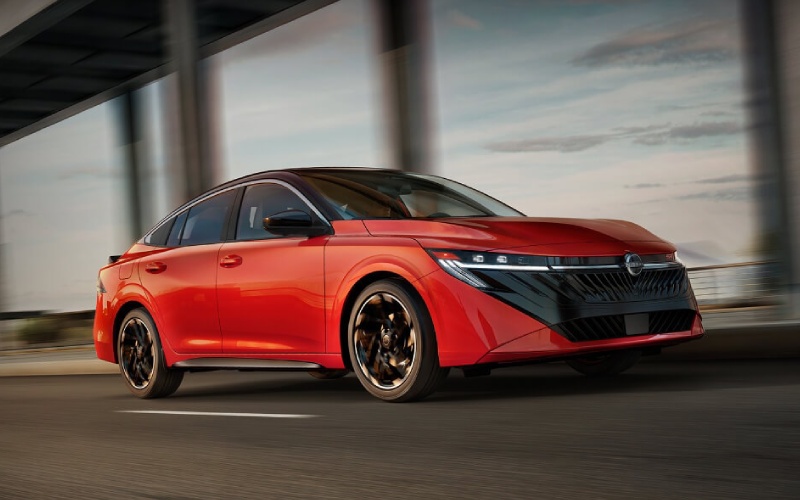
Matt Blatt Nissan – How to shop used Nissan SUVs and sedans around Vineland, NJ
Shopping for a used Nissan in the Vineland, NJ area should feel straightforward, transparent, and tailored to how you drive. Whether you are aiming for an efficient commute along Route 55, space for a growing family, or confident traction for year-round trips to the shore, used Nissan models offer a combination of technology, comfort, and peace of mind that fits real life. This guide focuses on two pillars most online shoppers ask about first: advanced safety and cabin technology. When you understand how Nissan Safety Shield 360 and NissanConnect work across sedans, crossovers, trucks, and EVs, comparing vehicles becomes simple—and you will know which features best match your day-to-day needs.
Many used Nissan vehicles include Safety Shield 360, a suite of driver-assistance features designed to help you see more and react sooner. While availability can vary by model and year, the suite often includes Automatic Emergency Braking with Pedestrian Detection, Blind Spot Warning, Rear Cross Traffic Alert, Lane Departure Warning, High Beam Assist, and Rear Automatic Braking. In everyday terms, that means help with keeping an eye on your blind zones on Delsea Drive, extra confidence when backing out of tight spots at Cumberland Mall, and helpful alerts if traffic suddenly slows in front of you. On select models, ProPILOT Assist supports steering, braking, and acceleration in highway traffic, easing fatigue on longer stretches between Vineland and the coast.
Nissan’s infotainment approach is similarly user-friendly. With NissanConnect, many models include Apple CarPlay and Android Auto integration, so your maps, playlists, and calls are right on the touchscreen. Voice control simplifies tasks on the move, and multiple USB-A and USB-C ports keep devices charged in every row. If you value flexible cargo solutions, crossovers like Rogue and Murano often offer split-folding rear seats and useful organization touches; the Rogue’s available Divide-N-Hide cargo system is a favorite for keeping groceries, strollers, or sports gear neat. For premium touches, many vehicles feature an available Bose Premium Audio System, leather-appointed seating, and a panoramic moonroof.
Online shoppers want clarity, so here is a quick, structured way to evaluate a used Nissan from your couch. Start with the safety and tech checklists below, then dig into the details using the listing photos, the free CARFAX Vehicle History Report, and the feature list. The goal is to align what the vehicle offers with how you actually drive—whether that is daily trips to schools and offices around town, weekend errands, or highway miles up to the Philadelphia metro area.
- Safety Shield 360 coverage: Verify which features are listed—look for Automatic Emergency Braking, Blind Spot Warning, Rear Cross Traffic Alert, and Lane Departure Warning.
- Highway helpers: See if the vehicle lists ProPILOT Assist or Intelligent Cruise Control for smoother travel on Route 55 and beyond.
- Parking confidence: Check for Intelligent Around View Monitor and front/rear sonar sensors to simplify tight spaces and parallel parking downtown.
- Infotainment essentials: Confirm Apple CarPlay, Android Auto, Bluetooth, and NissanConnect features are included and visible in photos.
- Charging and comfort: Scan for multiple USB ports, heated front seats, and a heated steering wheel for added daily comfort.
- Cargo flexibility: Look for 60/40-split rear seats and, on Rogue, the available Divide-N-Hide cargo system for versatile storage.
- Key convenience: Features like Remote Engine Start, Nissan Intelligent Key, and Motion Activated Liftgate can streamline busy mornings.
Beyond features, condition, and service history matter. Look at tire tread depth, brake photos if provided, and interior cleanliness to get a sense of previous care. CARFAX can show maintenance visits and ownership history, which helps you confirm that the vehicle fits your expectations. Many buyers also appreciate at-home test drives to ensure the driving position, sightlines, and ride quality match their comfort.
As you compare, think about your daily routes and must-haves. If most of your driving is city and suburban, a Sentra or Altima with Safety Shield 360 and smartphone integration may be all you need. For family flexibility, Rogue and Murano bring a balanced blend of space, comfort, and efficiency, with features like available Tri-Zone Automatic Temperature Control on larger models. If weekend projects or towing are in the picture, Frontier offers the torque and bed utility to handle home improvement runs or small trailers. For lower running costs and smooth electric torque, LEAF models deliver easygoing EV driving and regenerative braking that fits stop-and-go traffic around town.
Working with the right dealership matters just as much as choosing the right vehicle. You want clear information, helpful communication, and a process that fits your schedule. Many shoppers look for a free CARFAX on every listing, the ability to complete most steps online, and a return policy that adds confidence to an online purchase. The option for home delivery and at-home test drives is a major plus, along with responsive support that answers questions quickly and thoroughly.
To bring it all together, here is a simple roadmap for online shoppers evaluating a used Nissan today:
- Define your top three priorities: safety features, space, and fuel type (gas or EV) are common choices.
- Filter your search: narrow by body style, mileage range, and must-have features like Apple CarPlay or a 360-degree camera.
- Review the CARFAX carefully: confirm maintenance, ownership history, and any reported incidents.
- Compare two finalists: look closely at interior photos, cargo layouts, and driver-assist details to see which matches your life.
- Schedule an at-home test drive: verify comfort, visibility, and infotainment ease before you commit.
When the process is organized and transparent, buying a used Nissan becomes refreshingly straightforward. You end up choosing a vehicle that supports your routine—school drop-offs, commutes, shore trips—and you do it with the clarity that comes from having the right information at your fingertips.
Matt Blatt Nissan brings a customer-first approach that makes online buying feel natural, with helpful tools and support at every step. With the team serving Hammonton, Galloway, and Vineland, you can expect a consistent, professional experience whether you connect by chat, explore inventory online, or schedule a test drive at home. The combination of feature-rich Nissan models and a modern, transparent process helps ensure you get the right vehicle for your lifestyle without unnecessary friction.
Frequently Asked Questions:
Which used Nissan models most commonly include Safety Shield 360?
Across many years and trims, Rogue, Altima, Sentra, Kicks, and Murano frequently include Safety Shield 360 features. Always verify individual listings to confirm exactly which protections are equipped.
How can I confirm Apple CarPlay or Android Auto before visiting?
Check the listing’s feature list and cabin photos for the NissanConnect interface. If you do not see it, ask for a screen photo with Apple CarPlay or Android Auto icons visible.
What should I look for when reviewing a CARFAX report?
Look for regular maintenance, consistent mileage entries, and any reported incidents. A steady service history is a good sign of prior care.
Are at-home test drives available for used Nissans?
Yes, many shoppers choose at-home test drives to check comfort, visibility, and technology fit without changing their daily schedule.
How do I decide between a Rogue and a Murano?
Rogue emphasizes efficiency and flexible cargo solutions in a compact footprint, while Murano offers a more premium ride and added comfort. Compare interior space, features, and your driving mix to see which better matches your routine.
Request more information
Connect with us


Recent Blog Entries
- Can I monitor and manage a 2026 Nissan Sentra® from my phone in Atlantic City, NJ?
- Will a 2026 Nissan Frontier fit in a typical garage in Egg Harbor Township, NJ?
- Is the 2026 Nissan Rogue Easy to Park and Maneuver around Vineland, NJ?
- Why the 2026 Nissan Rogue Platinum AWD is a Smart Choice for Mays Landing, NJ Drivers
- Why the 2026 Nissan Murano SL AWD is a Smart Pick for Williamstown, NJ Drivers